Finalmente com Ubuntu 9.10 em casa e com ATI Radeon com 3D funcionando!
Já tinha ouvido muito falar que o driver proprietário das placas gráficas ATI costumam dar problema no Linux, mas por sempre usar nVidia, eu nunca soube realmente o trabalho que era procurar uma solução para isso.
Sou um recente usuário de uma placa Radeon HD 4650 (placa básica e barata, recomendo para quem não é um super-ultra-mega-aficionado por games!). Tudo funcionava muito bem quando de repente – ok, não foi tão repentinamente, é só para dar um ar dramático à cena – parou de funcionar, tudo após a instalação do Ubuntu 9.10, Karmic Koala. O driver de vídeo proprietário da ATI é composto de partes no kernel do sistema operacional, partes no sistema gráfico x.org, e softwares para configuração. Como é bastante dependente do núcleo do sistema, uma mudança de versão pode fazê-lo parar de funcionar – talvez tenha algum problema na programação, não sei.
Procurando em vários lugares, com várias palavras chaves diferentes, durante vários dias – lembre-se que sou novo em placas ATI – demorei a encontrar alguma informação que pudesse ajudar. A salvação veio quando achei no fórum do Ubuntu alguém referenciando o grupo xorg-edgers, que, segundo os próprios, tem “packages for those who think development versions, experimental and unstable are for old ladies”. 🙂
Tudo o que tem lá é experimental, então as alterações são por sua própria conta e risco! O que eles disponibilizam são algumas informações sobre as atualizações que estão no seu domínio, além de um repositório com os arquivos necessários para atualizar os drivers (e outras bibliotecas) no seu sistema de modo a fazê-lo utilizar as versões mais recentes em desenvolvimento.
Para quem tem placas com chips da família RV-6xx e RV-7xx, as notícias mostraram que era preciso:
1. Instalar o kernel novo:
== New in Karmic ==
    Radeon r6xx/r7xx 3D support. Install the 2.6.32-rc5
    kernel or newer from the Mainline Kernel PPA.
Eu instalei o kernel 2.6.32 rc7 daqui (linux-headers e linux-image, para a sua plataforma).
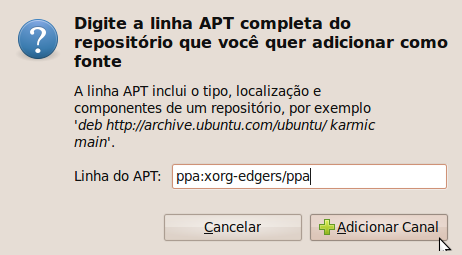
2. Adicionar o PPA do xorg-edgers, que provê os novos drivers aos canais de software (imagens com alguns passos):



3. Atualizar o sistema, por exemplo, utilizando estes comandos no Terminal:
sudo aptitude update && sudo aptitude upgrade
4. Mudar no arquivo /etc/X11/xorg.conf, na seção “Device”, o valor de “Driver” para “ati”. Se não existir, use esse aqui:
    # Arquivo /etc/X11/xorg.conf
    Section "Screen"
        Identifier	"Default Screen"

        DefaultDepth	24
    EndSection

    Section "Module"
        Load	"glx"
    EndSection

    Section "Device"
        Identifier	"Default Device"
        Driver	"ati"
    EndSection
5. Salve tudo, feche e reinicie. Não se esqueça de escolher o kernel novo na inicialização (se for o caso).
6. Se tudo estiver certo, você vai poder ativar os efeitos visuais em Sistema/Preferências/Aparência/Efeitos Visuais.
E um viva para a comunidade FLOSS! E outro para o driver livre! 🙂
P.S.: Não sei bem o porquê, mas o glxinfo mostra “OpenGL renderer string: Software Rasterizer”, ao invés de mostrar algo indicando que está sendo por hardware, mas está funcionando. 🙂
P.S.²: Se alguém precisar, comenta!

queria tanto que esse tutorial funcionasse para placas ATI xpress 1100 🙁
Hmm… mas o driver open não está funcionando para ela na 9.10? Ouvi relatos de que 3D está funcionando na 200M, que é uma R200. A X1100 parece que é uma R300 mais simples. Olha o status dela no site do x.org: http://www.x.org/wiki/radeon
Em todo caso, você pode tentar usar essa atualização que eu passei, porque o driver é mais novo.
Mas usar o driver proprietário nem vai rolar mesmo!
Todos os procedimentos foram feitos no SO de 32 bits ou 64? Estou usando o 64 e esta dando muitos problemas aqui mas seguirei esses passos ai e tomara que eu consiga hehe
Obrigado Kenzo
Fiz no de 32 bits, mas deve funcionar no 64 sim. Ao menos tem pacotes para as duas arquiteturas. 🙂
Confirmado o funcionamento com 64 bits! 🙂
cara ta muito foda e muito dificil de istalar, vc poderia passar o msn seu pra vc istalar aki no meu PC pelo TEam VIewer ?
eu ja tenho todos os arquivos que presisam istalados.
esperando resposta !
Atualiza para o Ubuntu 10.04 que as modificações que usei já estão incluídas nele!